
When to Upload Footage
As a general standard, all footage should be uploaded within 12 hours of the Sweep.
This timeline helps:
- Keep post-production on schedule
- Maintain client confidence
- Ensure editing can begin without delay
We understand that in some cases such as large file sizes or limited internet speeds, uploads may take longer. If you anticipate delays, notify Support proactively.
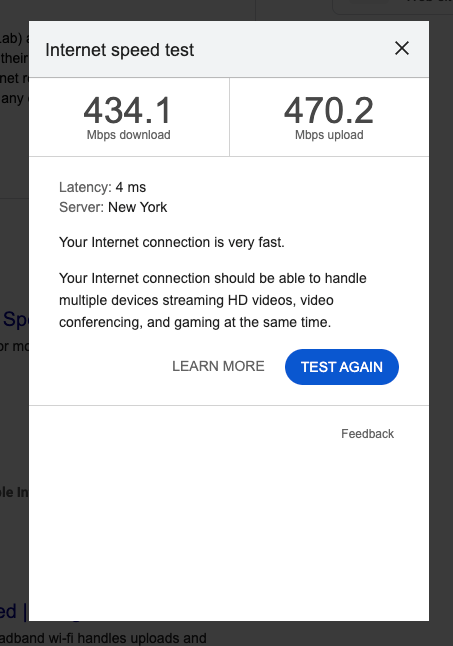
For best results, your uploading and downloading speeds should be as shown below:
Before You Begin Uploading
Before starting your upload:
- Review your footage for completeness
- Confirm all memory cards have been backed up
- Remove duplicate or unusable clips (if applicable)
- Organize files according to naming guidelines
Do not begin uploading until your footage is fully backed up.
Navigate to the Order
- Log in to your account.
- Navigate to the completed Sweep order.
- Locate the upload section for raw footage.
Upload All Raw Footage
Upload:
- All usable raw video files
- Corresponding audio files (if recorded separately)
- Any relevant B-roll
Do not selectively upload only “best takes.” Editors require full footage to build the final deliverables.
Confirm Upload Completion
Before closing the page:
- Ensure all files show as fully uploaded
- Verify no errors appear
- Confirm total file count matches what was captured
Large uploads may take time depending on file size and internet speed.
Final Verification
After upload:
- Double-check that files are accessible
- Confirm the order reflects the completed upload
- Notify Support if you encounter issues
If You Cannot Upload Within 12 Hours
If circumstances prevent you from uploading within 12 hours:
- Notify Support as soon as possible
- Provide an estimated upload timeline
- Avoid waiting until the deadline has passed
Clear communication protects production timelines.
Professional Standards
Timely delivery of footage is part of maintaining strong standing within the Blended Sense network. Consistency and reliability support ongoing opportunities.